A property portfolio website should answer three questions quickly: what do you offer, which properties should I look at, and how do I contact you about one? It does not need to look like a large property portal. For a landlord, letting agent, or holiday-rental operator, one accurate, useful page often makes a better first step than a complicated website with empty sections.
The basic structure is a clear headline, selected properties, genuine photographs, a short introduction, and an enquiry route. Give each image and sentence a job. If it does not help someone understand or ask about the property, it probably does not belong on the first version.
Download the free property portfolio website content plan (CSV). Use it to prepare your text, image choices, and publication checks before opening the builder. It is an editorial worksheet, not an automatic website import.
Decide who this portfolio is for
A prospective tenant wants to understand a home and ask about it. An owner considering your management service wants to understand the types of properties you manage. A holiday guest wants to understand the stay and its practical details. Those audiences overlap, but they should not have to untangle one mixed sales pitch.
Choose one primary audience for the first page. Use an honest headline such as "Rental homes managed by Riverside Properties" rather than "The best properties in the world." The business name is illustrative: write your own specific description of your actual area and work.
Decide the next action too. "Ask about this property" is useful when availability needs confirmation. Do not use "Book now" if the page cannot complete a booking, and do not display a stale availability claim as though it were a live feed.
Select properties and photographs deliberately
Start with the properties that match the page's purpose. An enquiry page does not need to expose your entire operating portfolio. Confirm that you have the rights and any necessary permission to publish the photographs and descriptions.
For each property, choose a readable lead image and a short sequence that shows the important spaces. A practical order is the main room, kitchen, bedroom, bathroom, then any relevant exterior or amenity. Label a shared area as shared. Do not use a beautiful nearby building as if it were the property being offered.
Airbnb's listing photography guidance recommends daylight, uncluttered rooms, and landscape images. Those principles help a standalone portfolio too. Its host ground rules also emphasize accurate photos and descriptions: editing should not conceal damage or suggest amenities that are not present.
Use real listing photos on your public portfolio. Generated images can illustrate a general article like this one, but they should not pass as evidence of a home someone can rent. Avoid over-editing room proportions, views, or condition.
Create the portfolio in JHA Solutions
The current JHA builder uses your property workspace to create a JHA-hosted portfolio page. The following walkthrough describes the existing controls, not a proposed design.
- Open Websites from the workspace navigation and choose New portfolio.
- Enter a Portfolio name and choose Create private portfolio. Creating it does not publish the page.
- In Basics, choose a preset and write the headline, introduction, and public link name.
- In Properties, select the properties you want to show and arrange their order.
- In Photos, add and arrange your gallery images and captions.
- In Contact, check the contact settings and decide whether to enable enquiry email alerts.
- Review the desktop, tablet, and phone previews. Save the draft, then use Publish portfolio when the content is ready.
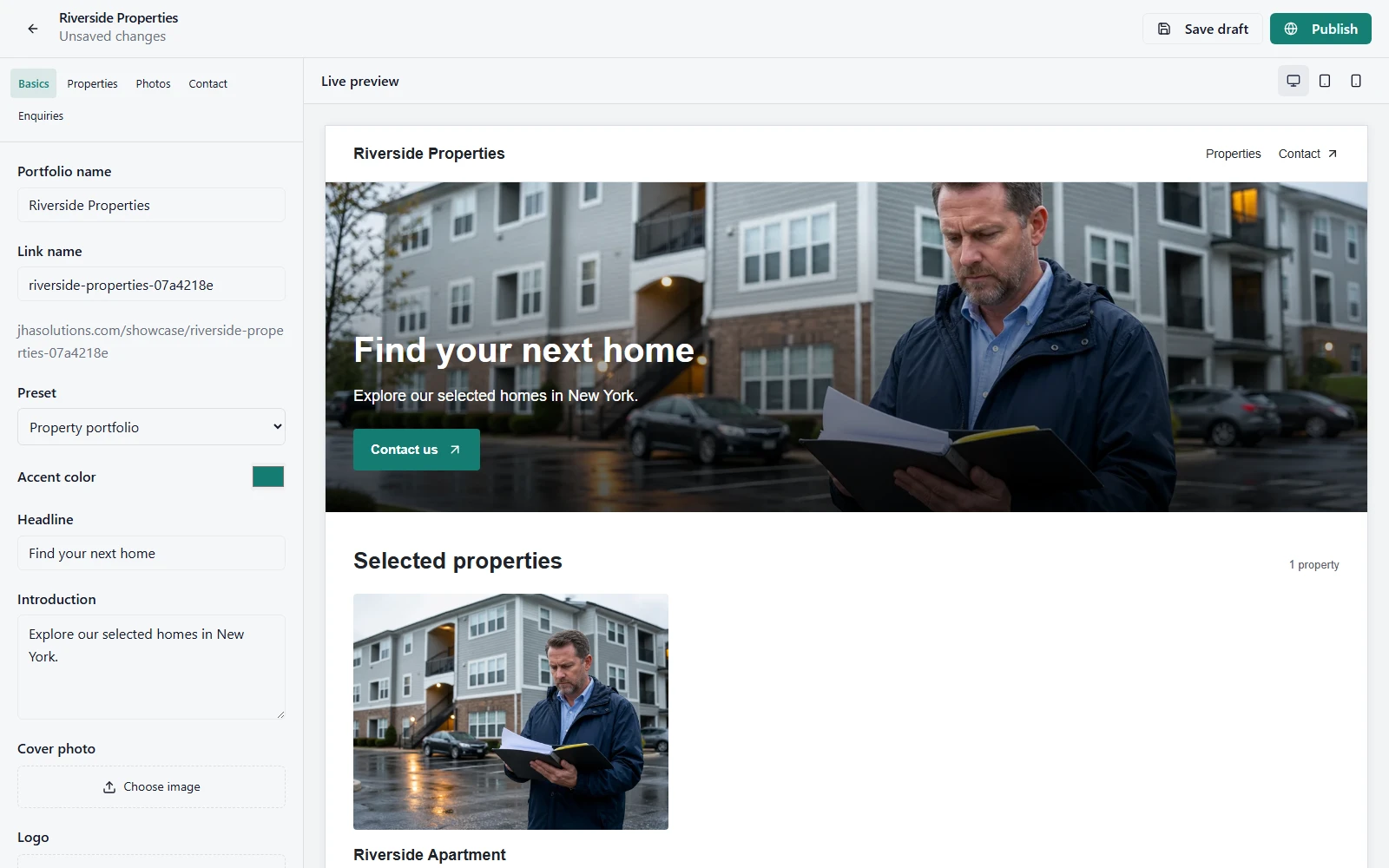
A private draft page is not a secure document store. Do not upload identification, tenant records, contracts, door codes, or other confidential material to the public gallery. Review the property's address visibility before publishing as well.
Choose a preset that suits the content
- Property portfolio: a practical starting point for a selected group of properties.
- Agent showcase: useful when you want the presentation to emphasize your professional identity alongside the properties.
- Holiday rentals: a suitable starting layout for presenting stays and their photographs.
Choose by checking your actual content in the preview, not by the preset name alone. A headline that fits on a wide monitor may wrap awkwardly on a phone. A portrait image may need a different position from a wide living-room shot. Keep descriptions short enough to scan without stripping out important distinctions.
Run a five-minute publication check
- Accuracy: confirm the names, selected properties, photos, captions, and claims match the real portfolio.
- Privacy: check address visibility and remove personal details from images and copy.
- Mobile: read the entire preview on a phone-sized screen and check that the contact route remains easy to find.
- Enquiries: submit a clearly labelled test enquiry on the published page and verify that it appears in Enquiries. If email alerts are enabled, check delivery separately.
- Sharing: open the public link in a signed-out browser before sending it to a client.
Email can be delayed or filtered, so do not depend on a notification alone. Make checking the enquiry inbox part of your routine. Agree who responds and how you record the next action. Our property management CRM guide explains the broader lead-to-follow-up process.
Know what this website does, and what it does not
JHA gives you a hosted portfolio link, property and photo selection, presets, previews, and an enquiry workflow. This is not a promise of a custom domain, direct booking checkout, a full channel manager, or instantly synchronized availability. Keep those distinctions clear when writing the page.
You can unpublish the portfolio when it should no longer be visible. Removing a portfolio does not mean deleting the underlying properties from your management workspace. Review old links and outdated claims whenever a property's status changes.
A portfolio page also does not automatically rank in search or generate qualified leads. Its first useful job is giving the people you already speak to a clear, current destination. Share it where it is relevant: your business profile, an enquiry reply, a permitted listing, or a client conversation. Avoid unsolicited bulk posting.
Build the workspace first, then publish when you are ready
You can prepare the content using the free worksheet and start JHA free with up to three properties. The portfolio builder is part of All Access, currently $5 per month, alongside the wider property-management platform. The free plan is a way to organize your initial records; it does not include every publishing feature.
Create an account and continue to All Access when you are ready to use the builder. Review current pricing and limits; checkout confirms applicable currency and taxes. The goal is a page you can actually keep accurate, not a subscription you buy before you have content.
Property portfolio website FAQs
Can I show only some of my properties?
Yes. Select the properties for that portfolio instead of treating your internal property list as a public catalogue.
Do I need a separate website for every home?
Not necessarily. Start with one focused portfolio when the properties serve the same audience. A different audience or presentation may justify a separate portfolio later.
Can visitors reserve and pay on the portfolio?
The workflow described here is for presentation and enquiries, not an end-to-end booking or payment checkout. Tell visitors what will happen after they contact you.
Sources and editorial notes
Reviewed October 6, 2026, against JHA's current website builder and Airbnb photography guidance. JHA sells the software in this walkthrough and is not endorsed by Airbnb. The cover is an AI-generated editorial illustration; the embedded editor screenshot is an actual interface using demonstration data. Neither depicts properties being offered for rent.